

Launch rules
Choosing which HUD shows on which table, by type of game, variant, specialty and size.
To write them: Settings › HUD › Launch rules.
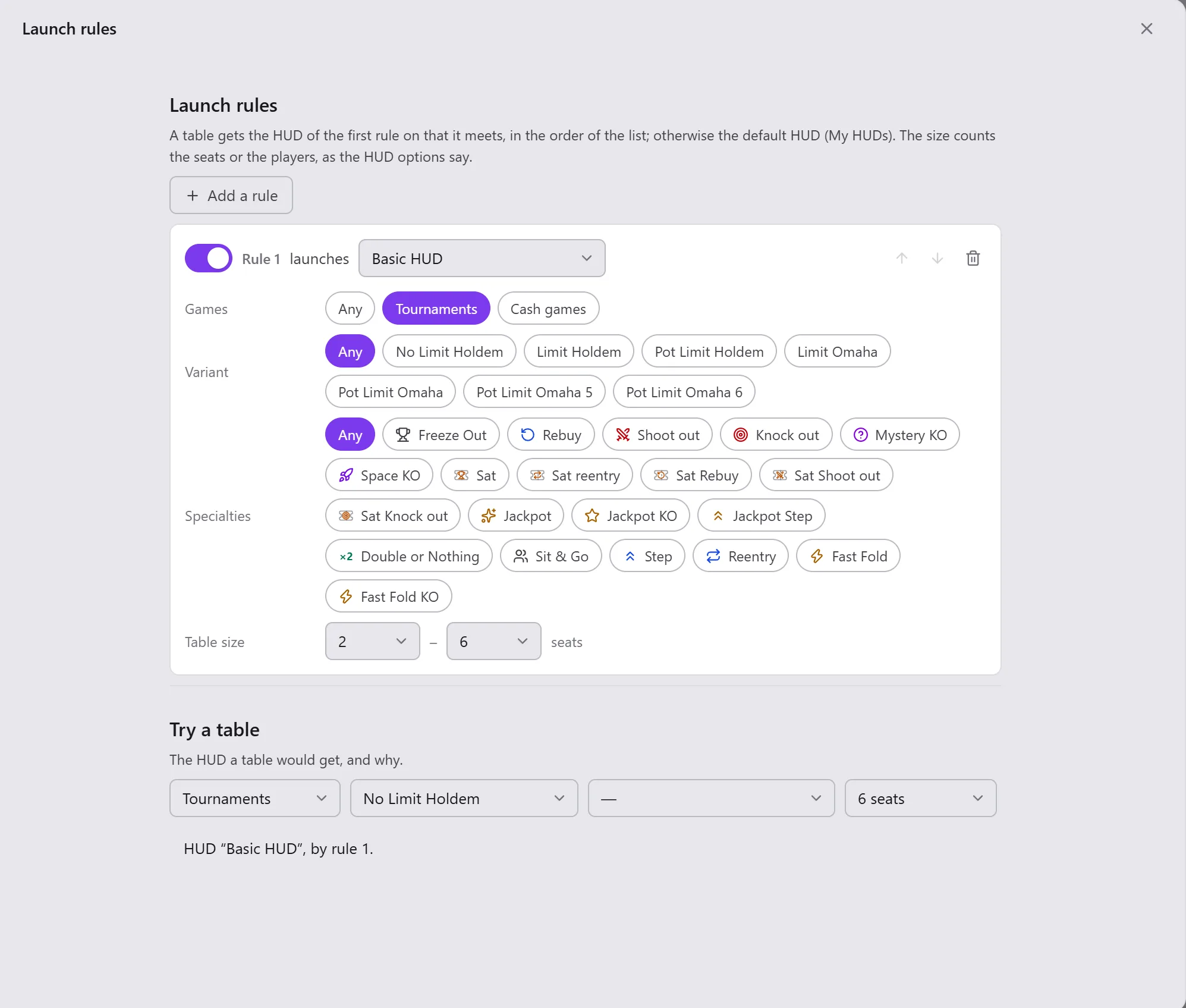
A table's HUD is the one of the first rule on that it meets, in the order of the list. If none takes it, it gets the Default HUD (see My HUDs and stat profiles). Without a rule, each table gets the default HUD.
Writing a rule
- Add a rule.
- Choose what it asks of the table: the Games (any, tournament or cash game), the Variant, the Specialties, the Table size (Minimum size and Maximum size, in seats).
- Choose the HUD launched.
Each rule can be ticked (Rule on), moved (Move up, Move down) and deleted (Remove the rule). Everything is saved at once.
The size counts the table's seats or the seated players, depending on the HUD start mode of the HUD options:
- Initial format (number of seats): a 6-seat table keeps the 6-seat HUD, even with 4 players;
- Number of seated players: the HUD changes with the number of seated players.
Trying a table
Try a table: describe a table (type of game, variant, specialty, size), Opencards says which HUD it would get and why: by which rule, or because no rule takes it.
On a real table, the last line of the Change the HUD menu also says by which criterion the HUD was chosen.